|


 English
 Spanish
 French
 German
 Italian
 Chinese (Simplified)
 Japanese
 Korean
 Arabic
 Portuguese

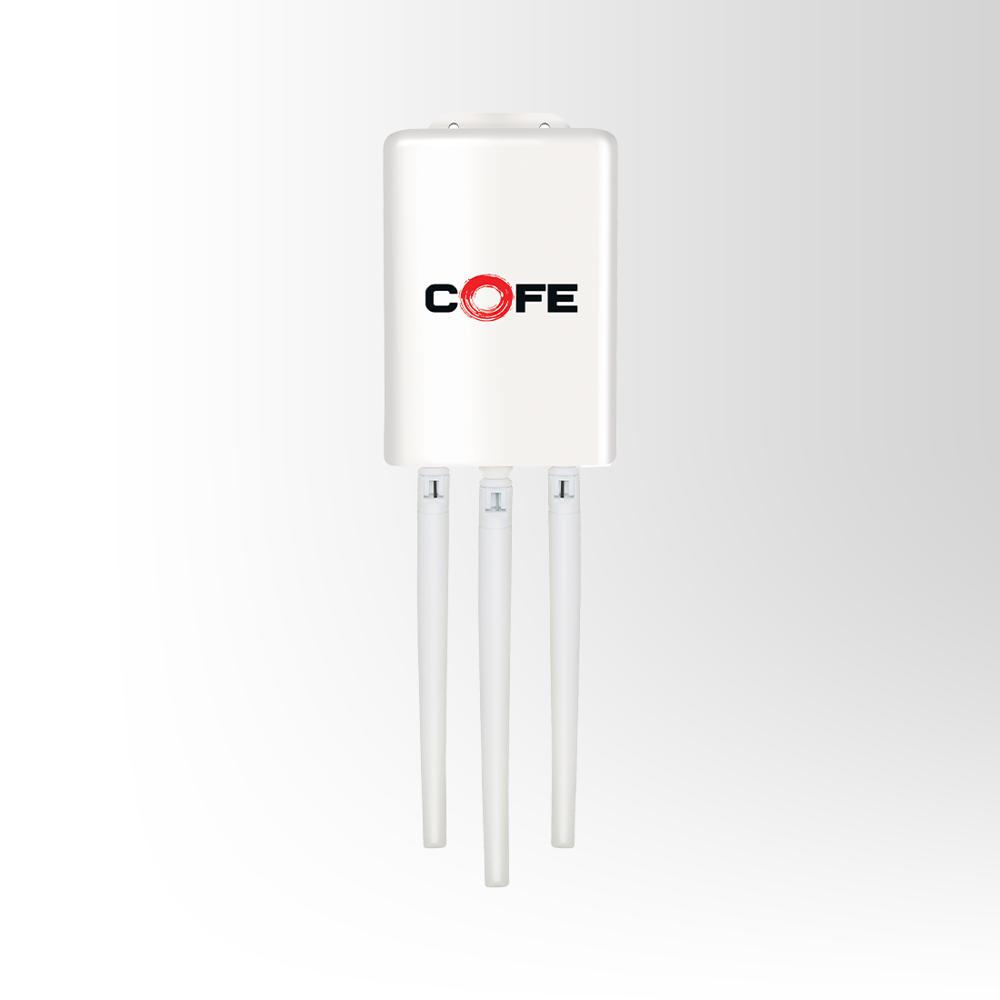
COFE CF-807 WDiii Router
1800.0 INR/Piece
Product Details:
- Features Powerful security features include guest network, network blacklist
- Network Device Router
- IP Routing Static routing
- Usage & Applications Networking
- Port 1
- Connectivity Type Wireless or Wi-Fi
- Number Of Ports/Pins Ports 1 10/100Mbps WAN/LAN Port, 1 USB 2.0 Port, 1 Micro USB Port
- Click to View more
X
COFE CF-807 WDiii Router Price And Quantity
- 100 Piece
- 1800.0 INR/Piece
COFE CF-807 WDiii Router Product Specifications
- Ports 1 10/100Mbps WAN/LAN Port, 1 USB 2.0 Port, 1 Micro USB Port
- 1
- Networking
- Static routing
- Wireless or Wi-Fi
- Powerful security features include guest network, network blacklist
- Router
COFE CF-807 WDiii Router Trade Information
- 1000 Piece Per Month
- 2-3 Days
Product Description
- 4G LTE : Provides fast and reliable high-speed mobile internet connectivity.
- All SIM Support : Compatible with all GSM network providers with full flexibility.
- Single Band WiFi : Operates on the 2.4 GHz band for wide coverage and stable connections.
- Connectivity : Wifi+Lan/ Wan support for flexible setup and stable connection.
- Range : Provides wireless coverage up-to 100 mtrs.
Advanced Security Features
The COFE CF-807 WDiii Router is equipped with leading security options that include configurable guest networks and network blacklist functions. These features provide added protection, allowing you to control user access and block unauthorized devices, which enhances the overall security of your wireless environment.
Versatile Connectivity
With its wireless (Wi-Fi) capability, combined WAN/LAN port, dedicated USB 2.0, and micro USB port, the router supports a range of networking setups. Whether used for streaming, browsing, or sharing files, its connectivity options ensure reliable performance tailored for networking and IP routing needs.
FAQ's of COFE CF-807 WDiii Router:
Q: How do I set up the COFE CF-807 WDiii Router for wireless connectivity?
A: To set up wireless connectivity, connect the router to your modem using the WAN/LAN port, then power it via the micro USB port. Access the web-based setup page through a browser and follow the on-screen instructions to configure your Wi-Fi settings.Q: What security features does this router offer for safe internet usage?
A: The router includes advanced security features like a guest network for isolated access and a network blacklist to prevent unauthorized devices from connecting. These tools help you monitor and control network access, ensuring a secure Wi-Fi environment.Q: When should I use the USB 2.0 port on this router?
A: Use the USB 2.0 port to connect external storage devices, printers, or other USB peripherals, allowing for shared network access to files or printing, which can be managed through the router's interface.Q: Where is the COFE CF-807 WDiii Router available in India?
A: This model is distributed, exported, and supplied by certified partners across India. You can purchase it through authorized distributors, electronics suppliers, or reputable online retailers.Q: What is the process for configuring static IP routing on this router?
A: To set up static IP routing, log into the router's administrative interface, navigate to the routing or network settings, and manually enter the required static IP routes as per your network requirements.Q: How can businesses benefit from the guest network feature?
A: Businesses can provide visitors with internet access via the guest network feature while keeping the main network and sensitive data secure. This separation minimizes security risks without compromising connectivity for guests.Tell us about your requirement

Price:
Quantity
Select Unit
- 50
- 100
- 200
- 250
- 500
- 1000+
Additional detail
Mobile number
Email

Other Products in 'Router' category



Contact Details
Contact Details
YEW ENTERPRISES
GST : 06AACFY0315L1Z9
GST : 06AACFY0315L1Z9
- Hsiidc, Plot No. 144a, Sector-16, Industrial Estate, Bahadurgarh, Jhajjar - 124507, Haryana, India
- Phone : 08045476602
- Mr Harish Goyal (Proprietor)
- Mobile : 08045476602
- Send Inquiry
 Send Inquiry
 |
YEW ENTERPRISES
All Rights Reserved.(Terms of Use) Developed and Managed by Infocom Network Private Limited. |
